The easy way
- Install Stash, move it to Applications and open it once.
- Open Settings → AI and click Connect next to Codex.
- Start a new session.
Stash changes only its own entry, keeps a one-time backup of the file, and stops without changing anything if the file is locked or looks unusual.
By hand
Add this to ~/.codex/config.toml:
[mcp_servers.stash]
command = "/Applications/Stash.app/Contents/MacOS/Stash"
args = ["--mcp"]In TOML a table runs until the next [heading], so put it at the end of the file.
Check it
In Codex type /mcp to see connected servers.
The ChatGPT desktop app
OpenAI's docs say the ChatGPT desktop app, the Codex command line and the editor extension share this file. We haven't tested Stash in the ChatGPT app with version 1.0, so tell us what you see. The ChatGPT website can't start a program on your Mac.
Try asking
- “Use the failing test output I copied.”
- “What did I dictate about this bug?”
- “Find the SQL I copied yesterday.”
What it can see
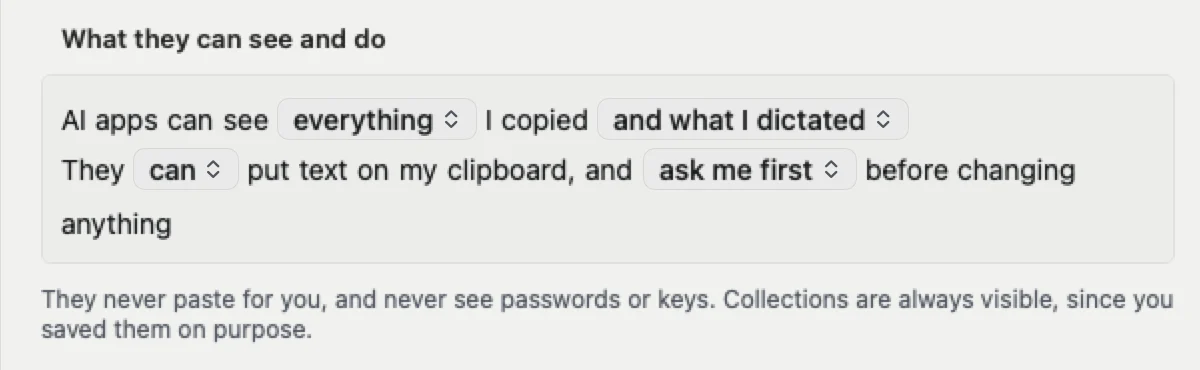
At first: your whole history, collections, dictations, snippets and dictionary, except secrets Stash recognises. What it reads goes to that app and usually to its company. Narrow it in Settings → AI: the last hour, day, 7 or 30 days, with or without dictations. The full list.
Questions
Is there one file per project too?
OpenAI's docs say trusted projects can have .codex/config.toml. Your own path belongs in the one in your home folder.
Does Codex ask before Stash changes something?
Stash asks in apps that can show the question; Codex is one of them.
How do I remove it?
Disconnect in Stash, or delete that table.